
Subtotal ¥0.00
Discover the best thermal wristband compatibility options for Zebra and Epson printers with durable, cost-effective wristbands for healthcare and events.
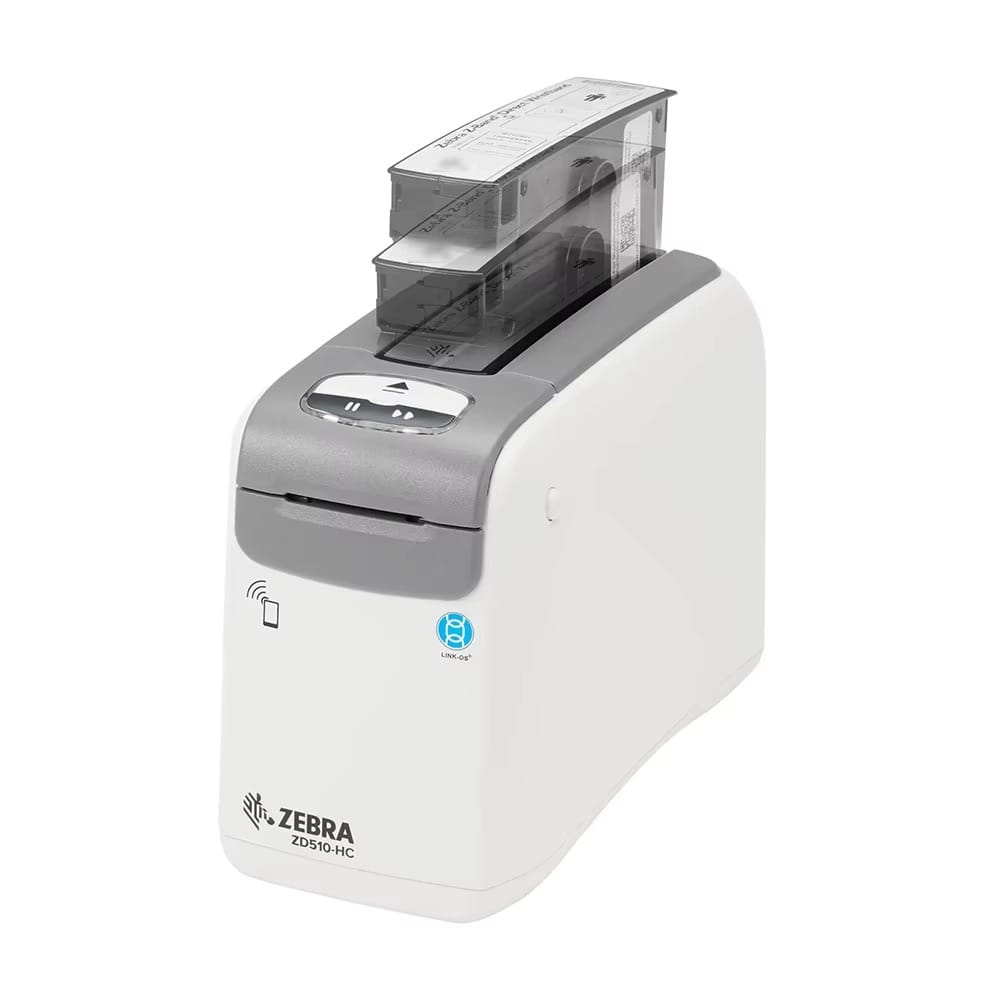
If you’re managing healthcare, event, or hospitality operations, you know that thermal wristband compatibility with your printers isn’t just a technical detail—it’s critical for smooth, error-free identification. Whether you use Zebra printers like the ZD510-HC or Epson ColorWorks series, choosing the right wristbands can save you time, cut costs, and improve durability. In this guide, you’ll discover the best options for Zebra and Epson printers, from direct thermal to vibrant inkjet solutions, plus why trusted providers like LinkWin deliver seamless compatibility without breaking the bank. Let’s get started and find the perfect fit for your wristband needs.
Understanding Thermal Wristband Types and Printer Compatibility
When choosing wristbands for your Zebra or Epson printer, it’s important to understand the different thermal wristband types and how they match with your device.
Direct Thermal Wristbands
Direct thermal wristbands print without needing ink or ribbons. This makes them perfect for quick, straightforward black-and-white printing. They are commonly used in healthcare for patient ID because of their simplicity and reliability. These bands typically come on rolls or cartridges designed to fit specific printers.
Color Inkjet Wristbands
If you need vibrant, eye-catching designs with customizable colors, color inkjet wristbands are your go-to option. These wristbands use special media that absorbs ink well and often provide better resistance to smudging or fading. Epson printers, especially their ColorWorks series, excel with these wristbands, commonly used in events and hospitality settings.
Key Compatibility Factors to Consider
Before buying wristbands, here’s what to check to ensure perfect printer compatibility:
- Media Size: The wristband width and length must match your printer’s supported sizes.
- Core Type: Some printers require specific core diameters or cartridge setups.
- Adhesive Closure: Look for tamper-evident or secure adhesive types, depending on your application.
- Material: Polypropylene and synthetic materials are popular for durability and water resistance.
- Loading Style: Zebra printers often use cartridge-based wristbands, while Epson models tend to work with roll-fed media.
By matching these factors carefully, you’ll get smooth printing, durable wristbands, and hassle-free operation every time.
Top Wristband Options for Zebra Printers
If you’re working with Zebra printers, especially the Zebra ZD510-HC, you have solid wristband choices built specifically for healthcare and other demanding uses.
Zebra ZD510-HC Wristbands
- Cartridge-based system for quick, hassle-free loading
- Designed for healthcare settings, with antimicrobial coatings to reduce infection risk
- Supports durable, water- and sanitizer-resistant wristbands
- Perfect for adult and infant sizes
Official Zebra Z-Band Series
- Made for tough environments with strong resistance to chemicals and water
- Available in multiple sizes including pediatric and adult options
- Trusted by hospitals worldwide for patient safety and comfort
Third-Party Compatible Wristbands
- PDC ScanBand Z and LinkWin direct thermal wristbands fit Zebra printers seamlessly
- Offer cost savings without sacrificing quality
- High barcode scan reliability for patient ID and tracking
- Available in various sizes and materials like polypropylene
OEM vs. Compatible Wristbands: Quick Look
| Feature | Zebra OEM Z-Band | LinkWin & Other Compatibles |
| Durability | Excellent (sanitizer-resistant) | Very good (water-resistant options) |
| Price | Higher | More cost-effective |
| Availability | Usually restricted to Zebra channels | Widely available online |
| Compatibility | Guaranteed fit | Tested for seamless fit |
| Variety of Sizes | Multiple sizes, adult to infant | Wide range, often includes extra options |
Choosing between OEM or compatibles depends on your budget and usage needs. If you want peace of mind and no guesswork, Zebra’s Z-Band series is solid. But if you want to keep costs down and get quality prints, LinkWin wristbands offer excellent value and compatibility.
Top Wristband Options for Epson Printers
Epson ColorWorks printers like the C4000, C3500, and C3400 are great for color wristband printing. These inkjet models handle a wide variety of media, making them perfect for vibrant and detailed designs.
Compatible Media for Epson
- Synthetic wristbands with special ink-absorbing layers for sharp, lasting prints
- Roll-fed formats, easy to load and replace
- Inkjet-friendly materials, built to prevent smudging or fading
Recommended Wristbands
| Brand/Type | Material | Features | Best For |
| Epson-Approved Synthetics | Polypropylene | High print quality, durable | Healthcare IDs, events |
| LinkWin Inkjet-Compatible | Synthetic blend | Vivid colors, water-resistant | Custom designs, hospitality |
Typical Applications
- Events: Color-coded bands for easy access control
- Patient ID: Clear, scannable barcodes with color alerts
- Custom Designs: Logos, text, and graphics with long-lasting prints
For Epson printers, opting for LinkWin compatible wristbands means you get sharp prints at a cost-effective price without sacrificing durability or comfort. They’re a solid choice for hospitals, events, and venues that need standout wristbands.
Direct Comparison: Zebra vs. Epson Wristband Solutions
When deciding between Zebra and Epson wristband solutions, it helps to look at their strengths side-by-side.
| Feature | Zebra Wristbands | Epson Wristbands |
| Printing Technology | Direct thermal (quick, simple) | Color inkjet (vibrant, detailed) |
| Best Use Cases | Healthcare with antimicrobial needs | Events, hospitality, custom designs |
| Compatibility | Various sizes, strong resistance | Wide size range, inkjet-compatible synthetics |
| Ease of Loading | Cartridge-based (easy but specific) | Roll-fed media (flexible but manual) |
| Cost | Higher initial, OEM focused | Lower initial, options with LinkWin compatible wristbands |
Key Points
- Direct thermal printing with Zebra is fast and reliable—great for black-and-white patient ID bands where durability and sanitiser resistance matter.
- Epson’s color inkjet printing shines when you want vibrant, custom wristbands, perfect for events or colour-coding in hospitality.
- Compatibility varies: Zebra’s cartridge system means you’re usually tied to certain wristband types, while Epson’s roll system works with a broader set of synthetic wristbands.
- Cost-wise, Zebra wristbands tend to be pricier upfront but offer proven durability, while Epson users can save with LinkWin wristbands, which are compatible, cost-effective, and maintain print quality.
Choosing between them depends on your main needs: Zebra for healthcare-grade ID bands, Epson for colorful, versatile applications.
Key Features to Prioritize in Compatible Wristbands
When choosing compatible wristbands for Zebra and Epson printers, focus on these must-have features:
| Feature | What to Look For | Why It Matters |
| Durability | Antimicrobial coating, water & sanitizer resistance | Keeps bands safe and legible in healthcare and busy environments |
| Comfort & Security | Soft materials, adhesive or tamper-evident closures | Ensures patient or guest comfort while preventing tampering |
| Print Quality | Clear, scannable barcodes, long-lasting images | Reliable scanning and easy identification over time |
| Sizes & Varieties | Options for adult, pediatric, and color-coded bands | Fits all users and supports alert coding or event organization |
Prioritizing these features guarantees wristbands that work well with your printer and meet the demands of your setting, whether healthcare, events, or hospitality.
Why Choose LinkWin Compatible Wristbands
LinkWin wristbands work seamlessly with both Zebra and Epson printers, making them a versatile choice for many users worldwide. Their high compatibility means you won’t waste time worrying about fits or print issues.
Premium Materials for Comfort and Reliability
- Made from durable polypropylene and synthetic materials
- Comfortable for patients and event guests to wear all day
- Features like antimicrobial coatings and water resistance keep bands safe and durable
Cost-Effective Without Sacrificing Quality
- Save on costs compared to OEM brands like Zebra Z-Band or Epson-approved media
- Reliable print quality ensures barcodes and IDs scan well every time
- Last longer without peeling or fading, reducing waste and reprints
Real Feedback from Users
Many healthcare facilities and event organizers have switched to LinkWin bands, praising their:
- Easy printer loading and consistent prints
- Comfortable feel even for kids and sensitive skin
- Durable adhesive closures that are tamper-evident and secure
| Feature | LinkWin Compatible Wristbands | OEM (Zebra/Epson) |
| Printer Compatibility | Zebra & Epson models | Limited to brand printers |
| Material Quality | Premium synthetic, antimicrobial | High quality but pricier |
| Cost | More affordable | Generally higher cost |
| Print Reliability | High, barcode scannable | Excellent |
| Comfort | Soft, hypoallergenic | Comfortable |
Choosing LinkWin means getting a trusted, adaptable wristband solution without breaking the budget, perfect for global users in healthcare, events, and hospitality.
Installation and Best Practices
Getting your thermal wristbands loaded right makes a big difference in printing quality and reduces downtime. Here’s a simple guide for Zebra and Epson printers, plus tips to keep things running smoothly.
Loading Zebra Cartridges
- Open the printer cover and remove the empty cartridge carefully.
- Insert the new Z-Band cartridge, making sure it snaps into place.
- Align the wristband so it feeds straight inside without twists or jams.
- Close the cover and run a test print to check alignment and print quality.
Loading Epson Rolls
- Open the printer roll compartment.
- Place the wristband roll on the spool, making sure the material unwinds in the correct direction.
- Feed the leading edge of the wristband media into the printer’s feed slot.
- Close the compartment and perform a test print.
Common Troubleshooting Tips
- Print unclear or faded? Check if the wristband media is compatible—for Zebra, direct thermal only; Epson works best with synthetic inkjet wristbands.
- Feeding issues? Remove jammed media and reload, ensuring smooth, tension-free feed.
- Scanner can’t read barcode? Adjust print darkness or confirm wristband and printer compatibility.
- Error messages? Restart the printer and verify cartridge or roll is installed correctly.
Maintenance Tips for Best Performance
- Keep the printhead clean—wiping with isopropyl alcohol will avoid smudges and streaks.
- Use wristbands recommended for your specific Zebra or Epson printer model to avoid damage.
- Regularly check printer rollers and sensors for debris buildup.
- Store wristbands in a cool, dry place to preserve adhesive and print surface quality.
Following these quick steps and maintenance tips will keep your Zebra and Epson thermal wristband printing smooth, reliable, and cost-effective.
