
Subtotal ¥0.00
Learn the 1 to 1 cleaning rule to extend thermal printhead lifespan cut downtime and lower TCO in high volume printing facilities
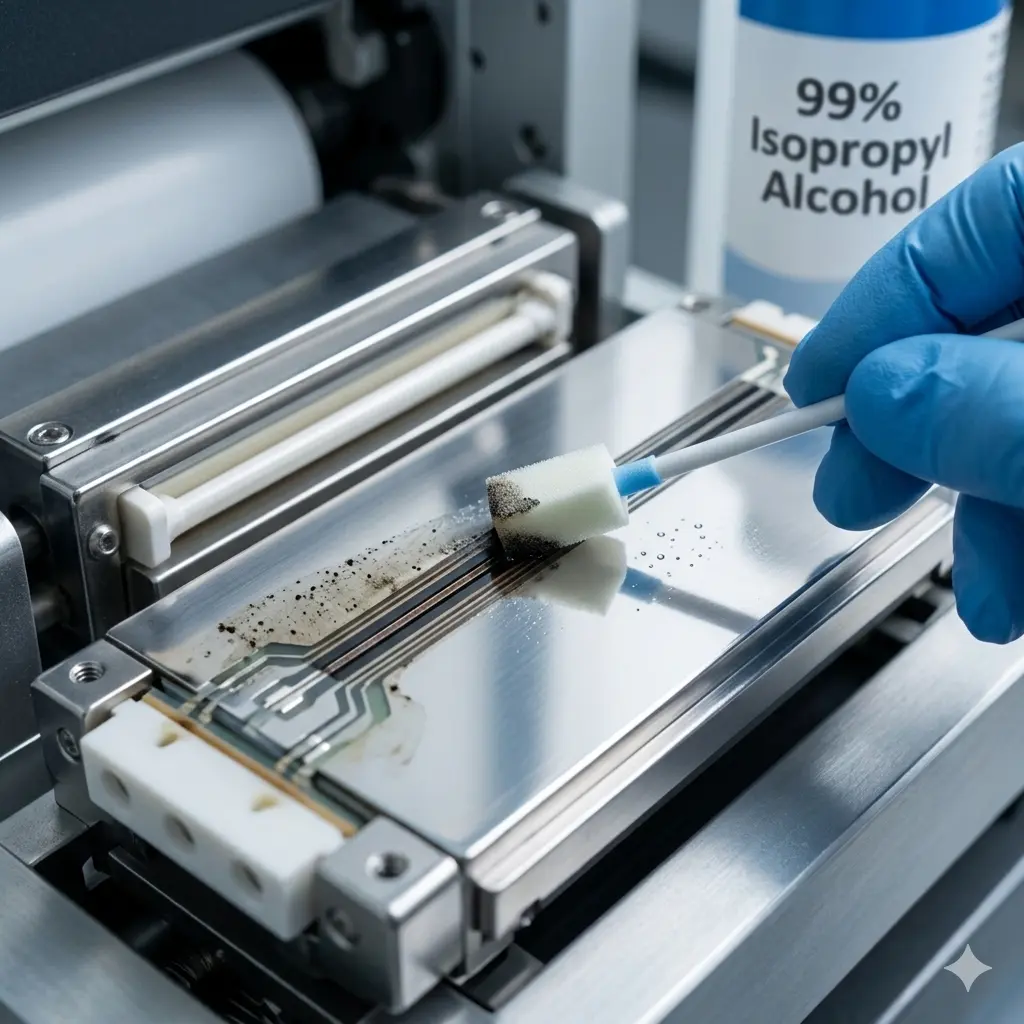
Your thermal printheads are the most expensive “consumable” in your facility.
Yet, most high-volume operations treat them as disposable, leading to premature printhead burnout and sky-high Total Cost of Ownership (TCO).
The fix is a simple, non-negotiable protocol: The 1:1 Cleaning Rule.
I’ve seen thisIf you are managing a high-volume fulfillment center, you already know that thermal printheads are the most expensive “consumables” in your facility.
Constant friction and adhesive buildup are the silent killers of your label printer uptime. Most operations wait for dead pixels or barcode scannability issues to strike before they react. By then, you’re already losing money to shipping chargebacks and line stoppages.
I’ve seen facilities slash their Total Cost of Ownership (TCO) simply by shifting from reactive repairs to a standardized preventative maintenance SOP.
In this guide, you’ll learn exactly how to implement the 1:1 Cleaning Rule—the industry gold standard for maximizing printhead lifespan.
Let’s dive right in.
The Cost of Silence: Why Thermal Printhead Maintenance Matters
In a high-volume warehouse, the quiet failure of a thermal printhead is the loudest hit to your bottom line. We view the printhead not just as a part, but as the most expensive consumable in your labeling ecosystem. Ignoring its health doesn’t just lead to a hardware swap; it triggers a domino effect of operational friction.
The Financial Reality of Neglect
When maintenance is ignored, the costs manifest in ways that a simple repair bill won’t show. High-speed sorting systems rely on crisp, high-contrast barcodes. If a printhead begins to fail, the “silence” of that degradation leads to:
- Shipping Chargebacks: Non-compliant labels resulting in heavy fines from major retailers and logistics hubs.
- Line Stoppages: Total operational halts while floor staff troubleshoot “mystery” scanning issues.
- Label Rejects: Massive waste of media and ribbons due to unreadable, streaky output.
- Premature Replacement: Burning through OEM printheads months before their rated lifecycle ends.
Shifting the Strategy: Proactive Preservation
Most facilities operate on a reactive replacement model—they wait for the “white lines” of death before swapping parts. We don’t. We treat the printhead as a critical asset requiring proactive preservation. By shifting to a consistent maintenance schedule, we eliminate the hidden costs of downtime and the frustration of rejected shipments.
| Financial Impact Factor | Reactive (Unmaintained) | Proactive (Maintained) |
|---|---|---|
| Average Lifespan | 3 – 6 Months | 12+ Months |
| Label Scannability | Inconsistent / High Reject Rate | 100% Reliability |
| Line Downtime | High (Unscheduled failures) | Minimal (Planned checks) |
| Replacement Frequency | Frequent / High TCO | Optimized / Low TCO |
The silence of a neglected printer is a warning sign. Maintaining your hardware isn’t a chore—it’s a strategic cost-saving measure that protects your facility’s efficiency.
Decoding the 1:1 Cleaning Rule
The 1:1 Cleaning Rule is the simplest yet most effective preventative maintenance SOP for industrial labeling. The concept is straightforward: every time you replace a roll of media or a thermal transfer ribbon, you clean the printhead. By tying maintenance to a standard operational task, we ensure it becomes a habit rather than a forgotten chore.
Why 1:1 is the Industry Gold Standard
In high-volume facilities, label printer downtime is a profit killer. The 1:1 ratio is the benchmark for several reasons:
- Consistency: It removes the guesswork. Operators don’t have to wonder when the last cleaning occurred.
- Contaminant Control: It clears away abrasive paper dust and ribbon wax buildup before they can bake onto the heating elements.
- Maximized OEM Printhead Lifespan: Regular intervention prevents the premature printhead burnout that occurs when debris forces the unit to run at higher print density settings.
Linking Maintenance to Workflow
The psychology behind the 1:1 Rule is about seamless integration. When an operator already has the printer open to thread a new ribbon, the printhead is fully exposed. Using isopropyl alcohol cleaning swabs at this exact moment takes less than 30 seconds but saves thousands in printhead replacement costs.
By making the “clean” a mandatory part of the “load,” we shift the facility culture from reactive repairs to proactive industrial labeling solutions. This disciplined approach ensures peak barcode scannability and a significantly lower Total Cost of Ownership (TCO) for your hardware fleet.
How Residue Destroys Thermal Printheads
Neglecting the 1:1 cleaning rule doesn’t just result in poor print quality; it physically destroys your hardware. In high-volume industrial labeling, the buildup of microscopic debris creates a “silent killer” for your equipment.
The Sandpaper Effect of Abrasive Wear
Every roll of labels carries abrasive paper dust. As this dust accumulates on the printhead, it acts like sandpaper against the delicate protective coating. Without regular removal, this friction leads to:
- Physical scratching of the heating elements.
- Thinning of the protective ceramic layer.
*I’ve seen high-volume facilities lose thousands of dollars simply because they underestimated the “silent killers” of printing: dust and wax. When you ignore The 1:1 Cleaning Rule: Maximizing Thermal Printhead Lifespan in High-Volume Facilities, residue builds up and begins a rapid cycle of mechanical and thermal destruction.
The Sandpaper Effect: Abrasive Wear
Even high-quality labels shed microscopic fibers. Without regular maintenance, this abrasive paper dust collects on the printhead surface. As the media moves at high speeds, this buildup acts exactly like fine-grit sandpaper, grinding down the protective ceramic coating and exposing sensitive components to the elements.
Thermal Insulation and Forced Overheating
Ribbon wax buildup and adhesive “ooze” create a literal blanket over the heating elements. This creates a dangerous feedback loop:
- Heat Blockage: The residue prevents heat from reaching the label or ribbon efficiently.
- Overcompensation: To fix light or patchy prints, operators often increase print density settings.
- Stress: The printhead is forced to run at much higher temperatures than intended to punch through the grime.
Permanent Pixel Burnout
Eventually, you reach the point of no return. Excessive heat leads to printhead burnout, where individual resistors—the pixels—permanently fail. This results in “dead zones” or white lines through your barcodes, making them unscannable and causing immediate shipping chargebacks. Unlike a dirty printhead, a burnt-out pixel cannot be fixed; it requires a total, costly replacement.
Step-by-Step Implementation in High-Volume Settings
Standardizing the 1:1 Cleaning Rule across a busy facility floor requires a foolproof routine. In my experience, the difference between a printhead lasting three months or a full year comes down to the tools and the technique used during every ribbon or media change.
The Essential Cleaning Kit
I don’t compromise on supplies. Using the wrong solvent can lead to premature printhead burnout or corroded elements.
- 99% Isopropyl Alcohol (IPA): This is non-negotiable. Lower concentrations (like 70% rubbing alcohol) contain water that lingers and can cause shorts or rust. 99% IPA evaporates almost instantly.
- Lint-Free Swabs or Cloths: Never use paper towels or shop rags that leave fibers behind.
- Cleaning Pens: These are excellent for quick, targeted wipes in thermal transfer printing setups.
The Proper Cleaning Process
Speed is vital in high-volume facilities, but a rushed job is a wasted job. Follow these steps to maintain peak barcode scannability:
- Power Down: Always turn off the printer to prevent electrical surges or “hot” cleaning.
- One-Way Swipes: Run the IPA-soaked swab across the printhead in one direction only. Do not scrub back and forth, as this grinds abrasive paper dust into the protective coating.
- Gentle Pressure: Apply just enough pressure to lift ribbon wax buildup. Let the solvent do the heavy lifting.
- Wait-to-Dry: Give it 30 to 60 seconds. If the head is wet when you close it, you risk “steam” damage or residue baking onto the elements.
Cleaning Best Practices at a Glance
| Action | Why it Matters |
|---|---|
| One-Way Swipe | Prevents scratching from trapped debris. |
| 99% IPA | Ensures zero moisture residue on sensitive electronics. |
| 1:1 Frequency | Stops adhesive and ink from “carbonizing” onto the head. |
Pro-Tip: Identifying the Burn Line
To catch wear before it stops your line, look for the burn line—the thin, dark strip of heating elements. If you see a physical notch or a permanent brown stain that won’t wipe away with alcohol, the head is nearing failure. Identifying this “point of no return” early prevents unexpected label printer downtime during peak shipping windows.
Beyond the Printhead: Completing the Maintenance Loop
While The 1:1 Cleaning Rule: Maximizing Thermal Printhead Lifespan in High-Volume Facilities is centered on the heating elements, the surrounding components dictate how well that printhead actually performs. I’ve seen many facilities clean their printheads religiously but still suffer from label printer downtime because they ignored the rest of the internal hardware. To trulyCleaning the printhead is only half the battle. In my experience running high-volume labeling operations, focusing solely on the heating element while ignoring the rest of the machine is a recipe for label printer downtime. To truly maximize the 1:1 Cleaning Rule, you have to look at the components that support the printing process.
Platen Roller Care: Preventing Slippage and Uneven Pressure
The platen roller is the unsung hero of industrial labeling solutions. It provides the counter-pressure needed for the printhead to transfer images clearly. If this roller is coated in platen roller residue—usually a mix of label adhesive and dust—you’ll experience labels slipping or tracking poorly.
- The Fix: Every time you clean the printhead, wipe down the platen roller with 99% Isopropyl Alcohol.
- The Benefit: Clean rollers ensure consistent feed speed, which is critical for barcode scannability and preventing “compressed” or distorted prints.
- Inspection: Look for nicks or flat spots. A damaged roller causes uneven pressure, forcing the printhead to work harder and shortening its life.
Sensor Calibration: Clearing the Printer “Eyes”
Thermal printers rely on transmissive and reflective sensors to detect the gaps between labels or marks on the backing. When paper dust accumulates, the printer “goes blind,” leading to skipped labels or “Paper Out” errors that halt production.
| Component | Maintenance Action | Outcome |
|---|---|---|
| Media Sensor | Air-blast or soft brush | Eliminates “Out of Stock” false alarms |
| Ribbon Sensor | Wipe with IPA swab | Prevents “Ribbon Out” errors during thermal transfer printing |
| Tear Bar | Adhesive removal | Ensures clean label separation without snagging |
Media Quality: Reducing Gunk at the Source
I always tell my clients that the cheapest labels often end up being the most expensive. Low-quality “bargain” media sheds excessive abrasive paper dust and uses inferior adhesives that bleed from the edges. This “gunk” builds up on the printhead and rollers, forcing more frequent cleaning cycles.
- Use High-Grade Ribbons: Better ribbon wax buildup management starts with using ribbons with a back-coating designed to lubricate the printhead.
- Precision Die-Cuts: Ensure your labels are cleanly cut. Rough edges release fibers that act like sandpaper on the printhead’s protective coating.
- Environment: Keep your media rolls stored in a dust-free area. Loading a dusty roll of labels into a clean printer defeats the purpose of the 1:1 Rule.
By maintaining the entire mechanical loop, you reduce the physical strain on the printer. This holistic approach ensures that your hardware doesn’t just survive the shift but maintains peak performance for millions of inches.
Measuring ROI: Impact of the 1:1 Cleaning Rule on TCO
Adopting the 1:1 Cleaning Rule is a strategic financial move, not just a maintenance task. In high-volume facilities, we see a direct correlation between cleaning frequency and the Total Cost of Ownership (TCO) of the labeling system. By shifting to proactive care, you transform the printhead from a frequent expense into a long-term asset.
Comparing Lifespan: Neglect vs. Maintenance
The data from our global partners shows a stark contrast in OEM printhead lifespan based on maintenance habits. When you ignore buildup, you are essentially throwing money away through premature hardware failure.
- Neglected Heads: Typically fail or show significant pixel loss within 3 months due to abrasive residue.
- Maintained Heads (1:1 Rule): Consistently last 12+ months, even in demanding 24/7 environments.
Calculating Your Annual Savings
By extending the life of your equipment, you drastically lower your cost-per-label. When you stop replacing expensive parts four times a year, the savings hit your bottom line immediately.
| Financial Metric | Neglected Protocol | 1:1 Cleaning Rule |
|---|---|---|
| Annual Replacements | 4 Heads | 1 Head |
| Estimated Part Cost | $2,000+ | $500 |
| Printer Downtime | High (Unscheduled) | Minimal (Scheduled) |
| Barcode Scannability | Inconsistent | 100% Reliable |
Case Study: Logistics Downtime Reduction
We recently assisted a logistics facility that integrated the 1:1 Cleaning Rule into their standard operating procedure (SOP). By mandating a quick swipe with every media change, they achieved a 90% drop in unscheduled label printer downtime.
They didn’t just save on printhead replacement costs; they eliminated the shipping chargebacks and assembly line stoppages that were previously bleeding their budget. Consistent maintenance ensures that your industrial labeling solutions remain an asset rather than a recurring expense.
Thermal Printhead Maintenance FAQs
I get asked these questions constantly by warehouse managers looking to protect
